From Vibe‑Code to Visuals
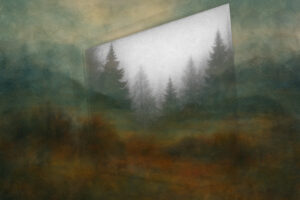
An image generated with gpt-image-1 through the Athletics Slack Chatbot
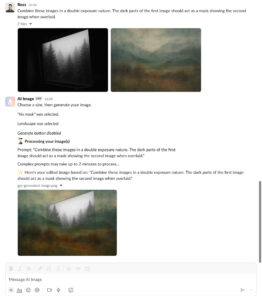
During the Athletics Open Studio, our Creative Technology team attempted to vibe-code a Slack chatbot application for creating images with gpt-image-1. While we didn’t get the bot running that day, we learned valuable lessons about vibe-coding, eventually got the chatbot working, and can now show you how to build one yourself.
For those just looking for the code and documentation, here’s the quick access (no recipe-blog-style scrolling required):
- GitHub repo: https://github.com/athletics/slack-ai-image-chatbot
- Slack docs that finally worked for us: https://tools.slack.dev/bolt-js/deployments/aws-lambda/
Our team started with an ambitious “one-shot” attempt using Gemini 2.5 Pro Experimental. I’ve been using Roo Code with OpenRouter instead of GitHub Copilot this year to evaluate emerging APIs and identify their strengths and hallucinations. Our team has built Slack apps that integrate with Notion databases before, so we thought this would be a quick exercise. While our previous app used slash commands, this time we wanted direct message interactions, which meant some architectural differences. AWS Lambda seemed like the natural choice.
We gave Roo a simple architectural prompt:

The response included a README with Slack-app setup instructions, Lambda settings, and a single JavaScript file. This was the expected response when comparing with our previous app. After deployment and workspace integration… NO JOY. We were living dangerously without a local dev environment, fully committed to the vibe. We fed CloudWatch logs back to Roo for debugging, but multiple deploy-and-pray cycles left us with silent DMs.
We (okay, maybe just I) held onto the belief that a model could nail this in one shot. Switching to GPT-4.1 mini gave us a fresh codebase, which was promising, but still no bot responses. Others from the team circulated in the studio and saw some of the projects the design team was doing with v0.dev. We gave that our last ditch effort. Finally, signs of life! Though the bot remained inconsistent and wouldn’t generate images from gpt-image-1.
So what actually fixed it?
Slack’s developer documentation was transitioning from api.slack.com to docs.slack.dev, with Bolt, SDK, and CLI integration docs on tools.slack.dev. The challenge wasn’t outdated documentation but a Goldilocks dilemma: we weren’t sure whether to use Socket Mode or stick with the Inactivity Endpoint for DMs. Most LLMs referenced outdated implementations, confidently providing defunct patterns. The breakthrough came with Bolt JS’s Lambda deployment docs. Using the o3 model to research those docs against our current code led to a refactor that finally produced thrown errors through the DMs. Because o3 can browse live sources, I was able to feed it errors and started getting meaningful updates with cited references that didn’t tell me how good the codebase already was, or try a boil-the-ocean refactor.
The use of Serverless and ngrok from the docs made local development feasible, and the Serverless deployment took care of the annoying aspects of working in the AWS GUI. Once the endpoints were in place and the scopes matched, the DM called to gpt‑image‑1 started returning text-to-image generation and image-to-image edits. Chef’s kiss.
Oh, and about those annoying recipe sites: David from our team vibe-coded a site that skips the life story and delivers just the ingredients and instructions when you share a recipe link.